BOMs, emails and spreadsheets live apart
The RFQ starts in an email, the comparison ends up in Excel, and the decision stays in a thread or in the buyer’s head.
VendorIQ brings AI RFQ automation and supplier quote comparison to technical procurement. Developed by PWM Automatyka, it keeps BOMs, supplier replies and purchase order drafts in one workflow. You see prices, lead times and missing information — and make the decision.
About 30 minutes on your workflow · reply within 1 business day
M12 sensor · 20 units · net prices in PLN
Delivery in 2 days for PLN 50 more than quote B. Quote C needs quantity confirmation.
The RFQ starts in an email, the comparison ends up in Excel, and the decision stays in a thread or in the buyer’s head.
VendorIQ extracts the data, suggests suppliers and prepares RFQ drafts. Uncertain information is flagged for review.
The buyer reviews price, delivery, completeness and risk before approving. A purchase order draft follows the decision.
Every project shows one next step: what to do now, where, and what comes after it.
Items from the email and attachments appear in one list. Gaps show up in the BOM right away, and you complete them there.
Use your company database and, optionally, the VendorIQ catalogue. Approve the selection, then the sending of one RFQ per supplier.
Prices, lead times, missing details and substitutes in one comparison, with a recommendation. You also see which suppliers you are still waiting for, and until when.
The purchase order draft is based on the quotes you accept.
Real application screens. Projects, suppliers and amounts are demo data.
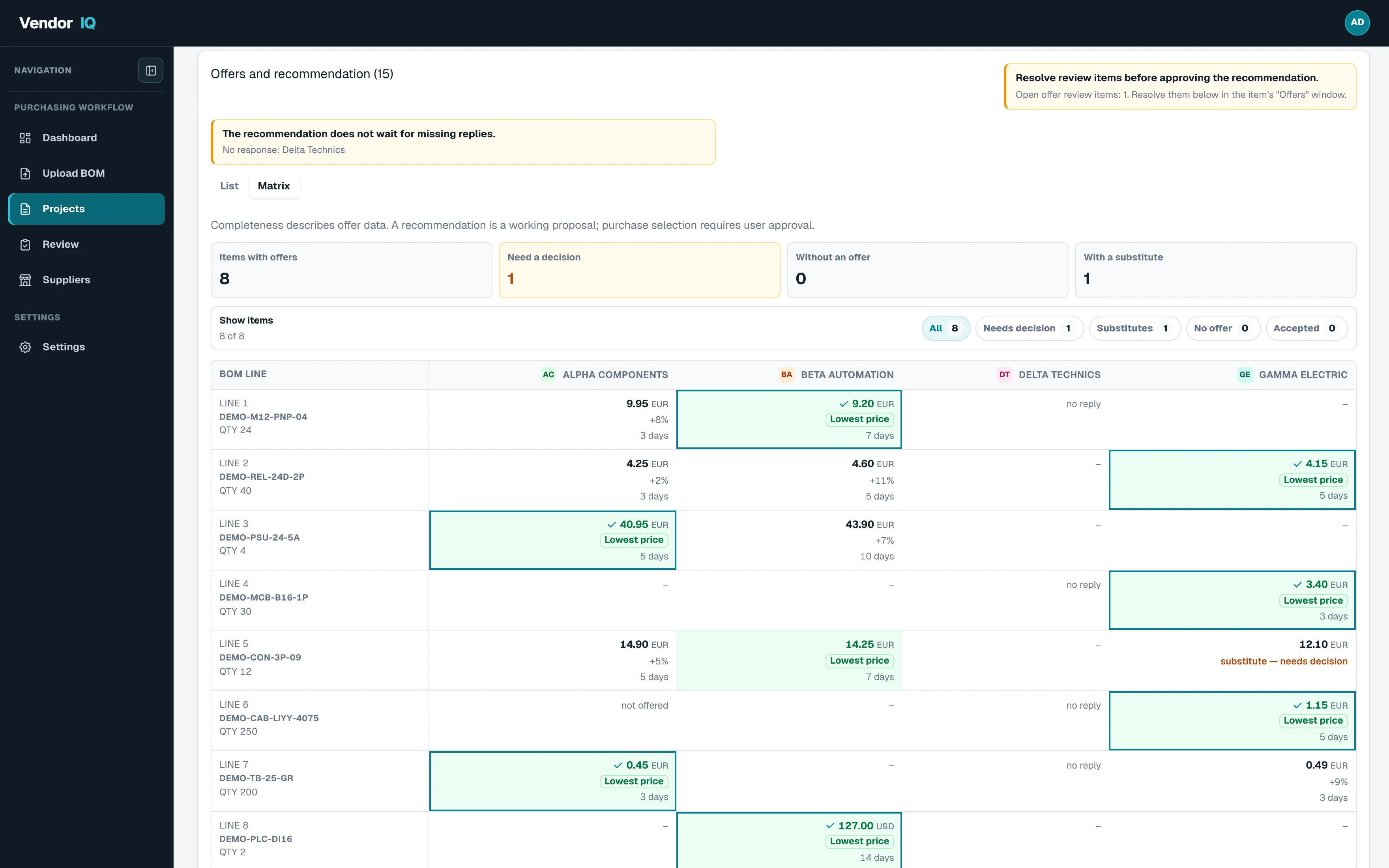
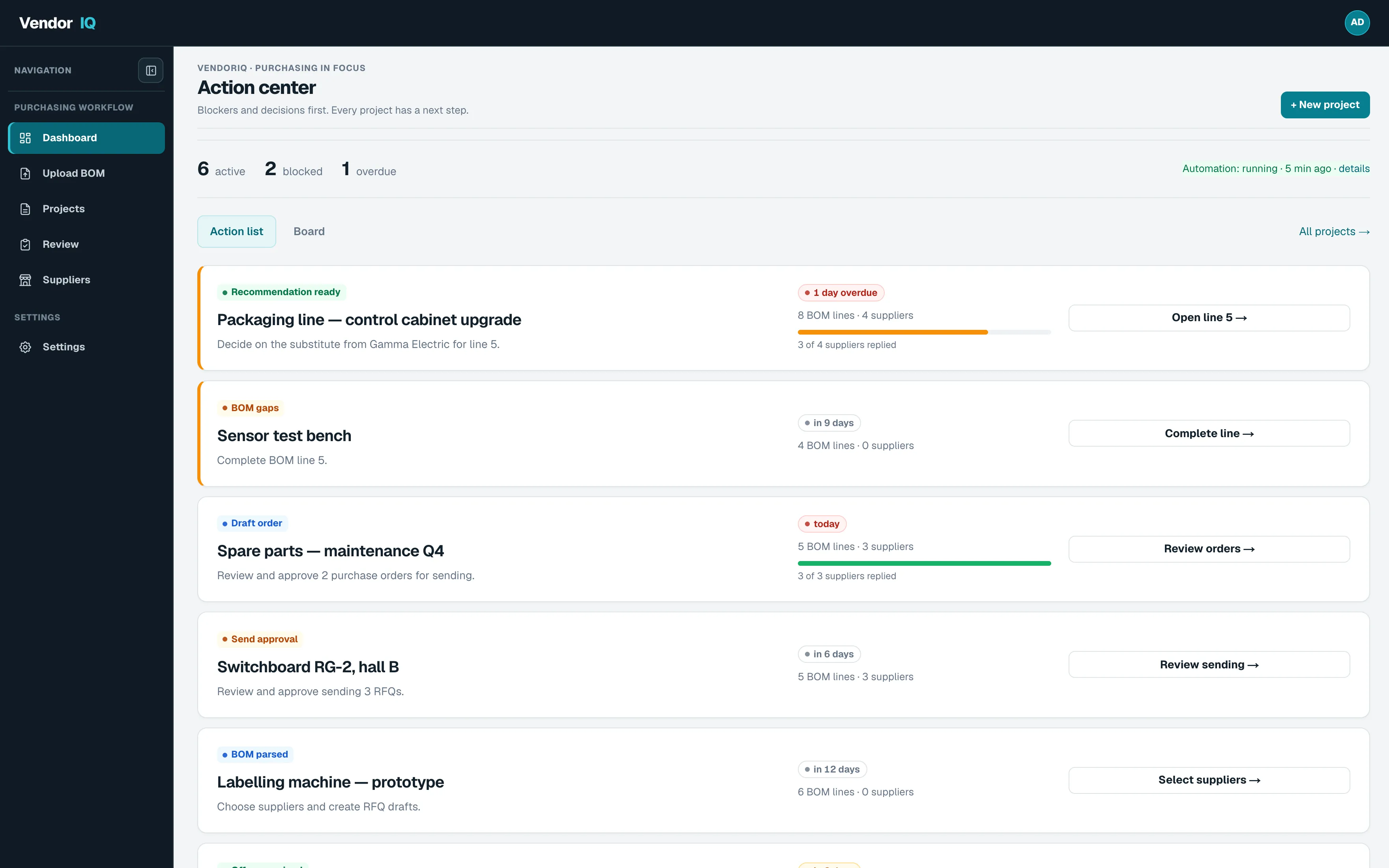
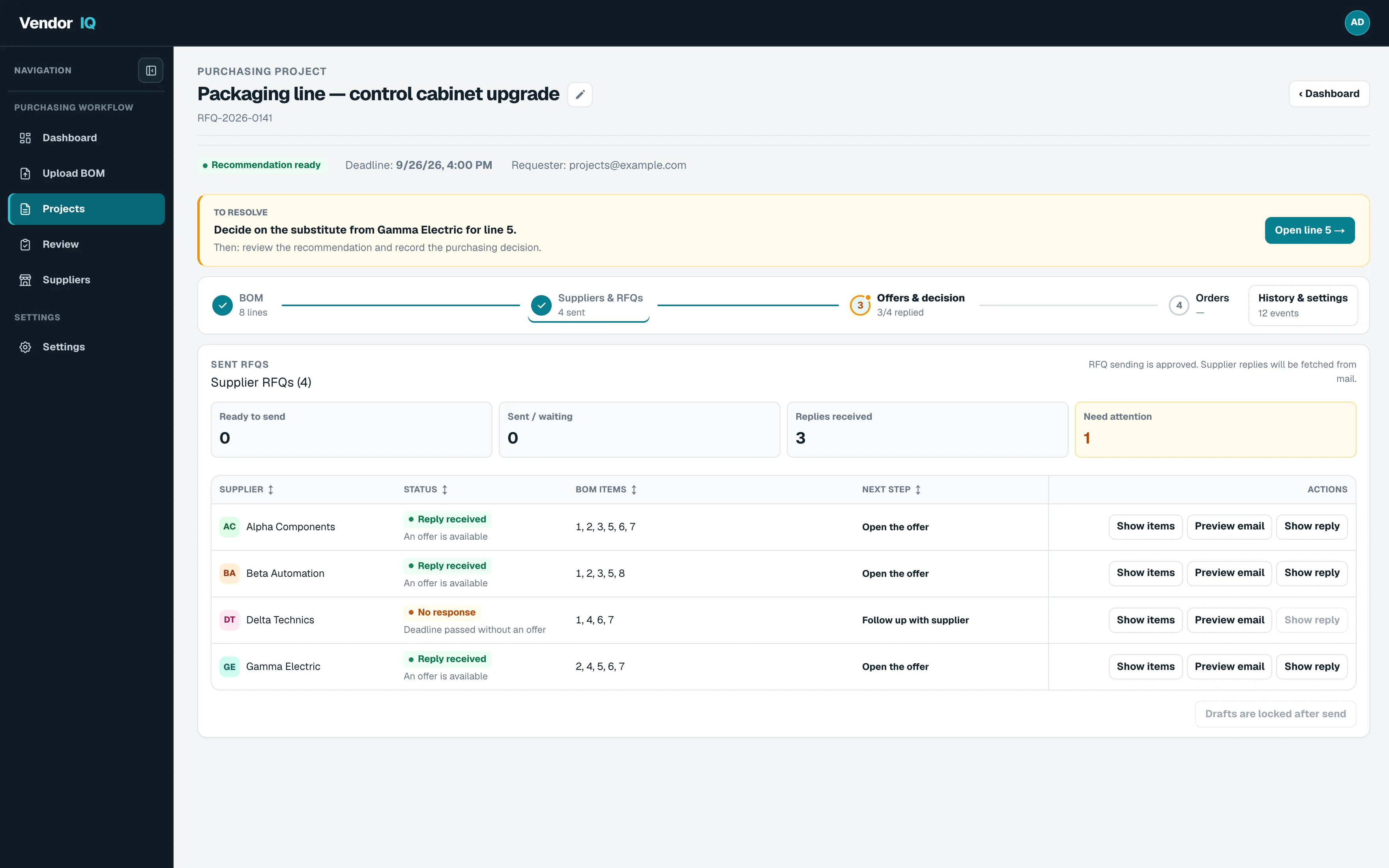
See what the system prepares, where it highlights missing information and which decisions stay with your team.
Your BOM, company database and the VendorIQ catalogue. Preview suppliers, covered items and missing information before creating drafts.
Explore the workflow from BOM to sendingPrice, quantity, currency, delivery and validity alongside the right BOM item. AI recommendations include a reason, and missing data stays visible.
See a worked comparisonYour company database is the default. Enable the VendorIQ catalogue for each project when needed. Only records ready for use are included in matching. Enabling the catalogue does not send any emails.
A good fit for BOMs, short production runs, maintenance and projects with several suppliers.
Source project components when price, lead time and possible substitutes matter.
Compare devices, enclosures and accessories without manually piecing together multiple emails.
Purchase for projects and short runs when every parts list needs several sources of supply.
Check spare-part availability sooner, before a missing delivery holds up a repair.
It starts with everyday component purchasing: different quote formats, incomplete replies and delivery dates to compare before ordering.
VendorIQ is developed by PWM Automatyka sp. z o.o., an industrial automation company. It grew out of our own challenge: getting from a parts list to a purchasing decision faster.
Pricing and infrastructure requirements are agreed individually.
Explore a scenario for time saved on recurring RFQs. The calculator explains its assumptions; results are estimates, not guaranteed savings.
VendorIQ keeps data, decisions and sent messages in one history. You can return to the information behind each decision.
Example workflow history
VendorIQ is developed by PWM Automatyka sp. z o.o. Company details and contact information are available in the Trust section and in the footer.
VendorIQ is an RFQ workflow system for companies that regularly buy technical components. The process, from BOM intake to supplier recommendation, stays in one place instead of moving between email and spreadsheets.
The system takes over repetitive work: reading emails and attachments, matching suppliers, drafting RFQs, analyzing replies, preparing recommendations and creating purchase order drafts for approval.
No. VendorIQ prepares a recommendation, but the purchasing decision, substitute approval and final order submission remain with the user.
Every project shows one next step: what to do, where, and what comes after it. If something blocks the process — a missing BOM line, a substitute to decide on or a failed send — a button takes you straight to where you resolve it. The dashboard collects these steps across projects: blockers first, then actions, then projects waiting for supplier replies.
During the demo stage we discuss a pilot and an individual quote. Scope depends on RFQ volume, email integration, supplier data and the level of technical support required.
Infrastructure, email, AI model and data-access requirements are agreed before the pilot. An on-premise deployment and integrations require a separate scope and quote.
For companies that regularly collect quotes from multiple suppliers: technical parts, production components, maintenance, repair and operational purchasing.
Your company supplier database is the starting point. You can also enable the VendorIQ catalogue for a project. Only records ready for use are included in matching; a catalogue entry does not guarantee product availability. You approve recipients and sending separately.
Industrial automation, electrical panels, MEP/HVAC construction, machine building, automotive, electronics/EMS and maintenance teams. In construction the file may be called a BOQ, takeoff or MTO, but the purchasing challenge is the same.
Show us how you collect quotes. Together, we can identify what to automate and how to evaluate a pilot.